Your Duelist
Your duelist is your avatar in the Duelverse: you design them in the character creator, walk them through Astra Station and show off with emotes.
Controls and animations are still being tuned and may change before release.
Moving around
| Key | Action |
|---|---|
| W A S D | Move |
| Shift (hold) | Run |
| Space | Jump |
| Ctrl | Crouch, press again to stand up |
| Q (hold) | Open the emote wheel |
| E | Talk to a shopkeeper, challenge a duelist or use a terminal |
Your duelist moves with weight: they lean into starts, brake when you stop, pivot on sharp turns and turn on the spot. A quick tap of a key takes one short step and stops right away. Stand still for a while and they start to fidget. People around the station notice you too: shopkeepers and duelists greet you with a wave or a tip of the hat when you walk up.
Menus and windows
| Key | Opens |
|---|---|
| I | Your items: cards, boosters, foil items, Capsule Tickets, duel disks, companions and more |
| P | Your Duelist Profile |
| T | Your team |
| O | The online window |
| Enter | The chat |
| Tab (hold) | The list of duelists online |
| F7 | The audio panel |
| F10 | Photo mode |
| F11 | Report a bug, also in a duel |
| Esc | The Esc menu |
The same windows sit on the bar at the bottom of your screen. A small gold number on an icon shows what is waiting there: quest rewards to claim, new unlocks in your profile, applications and invitations for your team, friend requests and tournament calls.

Every window of the station shares one look: night-blue panels with fine champagne lines and a few stars, titles in wide capital letters, and buttons that light up warmly with a glowing edge when you point at them. Your duelist card sits in the top-left corner, your EXP under it as a fine line with a star at its tip. Near shops, duelists and terminals a small E shows what you can press.
Your DP always show in the corner of the screen and in your items. Messages such as rewards and invitations queue up at the side, three at a time, until you close them with their X. While you type in a text field, Esc or right-click only leaves the field and closes nothing else.
Esc menu
With nothing else open, Esc opens a small menu: RESUME, SETTINGS, CONTROLS, BANLISTS, REPORT A BUG, LOG OUT and QUIT GAME. It reads MENU over DUELVERSE ASTRA under a small constellation; the entry under your mouse lights up with a star and an arrow, and LOG OUT and QUIT GAME sit a little apart from the rest.
- CONTROLS lists every key of the station, the duel and the Team Base.
- BANLISTS opens the current GOAT, Domain and Genesys lists, on the tab of your active deck's format. See Banlists.
- LOG OUT reads MAIN MENU when you play without a Discord login. It and QUIT GAME ask SURE? first.
The world keeps running while the menu is open; it is not a pause.
Settings
Esc > SETTINGS holds:
- Graphics: resolution, window mode (fullscreen, borderless or windowed), VSync, an FPS limit (30, 60, 120, 144 or unlimited) and the quality level.
- AUDIO SETTINGS (F7) opens the audio panel.
- CARD TEXT: card names and effects in ENGLISH, DEUTSCH, FRANÇAIS, ITALIANO, PORTUGUÊS or ESPAÑOL. The text changes wherever you read about cards: the card inspector, the Deck Builder, the binder, your items, pack opening, the shop, the market, trades and your Duelist License. In the card styles the game builds itself, the printed text follows too. The questions a duel asks and the duel log stay in English.
- DISCORD STATUS: what your Discord profile shows while you play, FULL, GAME ONLY or OFF (see Online & Social).
- IN BACKGROUND: what the game does while another window, such as Discord, OBS or a browser, has the focus. KEEP RUNNING (the default) runs on with sound, KEEP RUNNING, MUTED runs on without sound, and PAUSE WHEN OFFLINE pauses the game, but never while you are online, in a duel or in a tournament. Without the focus the game runs at 30 FPS, and your movement keys and voice control wait until you are back.
- NAME STYLES: ANIMATED (the default) or CALM. CALM keeps other duelists' name styles but stops them moving; your own name is not affected.
Reporting a bug
Something went wrong? Press F11, wherever you are: in the station, in the middle of a duel or in the main menu. REPORT A BUG is also in the Esc menu and in the duel's ⚙ options.
- The game takes a screenshot first, so the picture shows the problem and not the form.
- Pick what it is about: DUEL, CITY, ONLINE, SHOP / CARDS or OTHER.
- Write in a few words what happened (up to 1,000 characters) and press SEND.
The screenshot, the log of your newest duel, the end of the game's log and the game's build information go along by themselves, together with where you were. Your Windows user name and Discord name are taken out of the logs first, and your save and your chat never go along. A small Report sent note appears at the top, even in a duel, and you can keep playing while it goes.
Reports go to the team when you are logged in with Discord on a server, up to 3 every 10 minutes. As a guest, without a server, or past that limit, the report is saved on your PC instead: the game shows the folder with OPEN FOLDER, so you can send the files to the team on Discord yourself.
The admins mark every report as open, in progress or done while they work through them, so nothing gets lost. You don't get a message when that changes; the fix shows up in the patch notes.
Copying the crash log
The report form also has COPY LOG: it puts the game's log on your clipboard as text, so you can paste it straight into a Discord message to the team. It holds the errors so far, the last things you did (where you were, your duel, which 3D monster was loading), the end of the game's log and your current duel's log, at most about 45 KB, cleaned the same way as a report.
If the game closed unexpectedly - a crash, or it froze and you closed it - the next start writes a crash log of that time into the CrashLogs folder in the game's data folder (the newest ten stay). COPY LAST CRASH on the report form copies the newest one. Admins also get a notice, ASTRA CLOSED UNEXPECTEDLY, with COPY CRASH LOG, OPEN FOLDER and SEND TO TEAM, and a small note at the top when an error was caught while the game kept running.
To report a duelist rather than a bug, see Reporting a player.
Emotes
Hold Q to open the emote wheel around your cursor. Point at a category and let go of Q (or left-click) to open it, then point at an emote and let go again. Right-click goes back to the categories; right-click there or Esc closes the wheel.
| Category | Emotes |
|---|---|
| GREET | Wave, Hat Tip, Point, Finger Guns |
| CHEER | Cheer, Heel Click, This Guy, Taunt |
| DANCE | Dance, Groove, Arm Flare, Chicken Wing, Sprinkler, Groovy, Pump It, Jig |
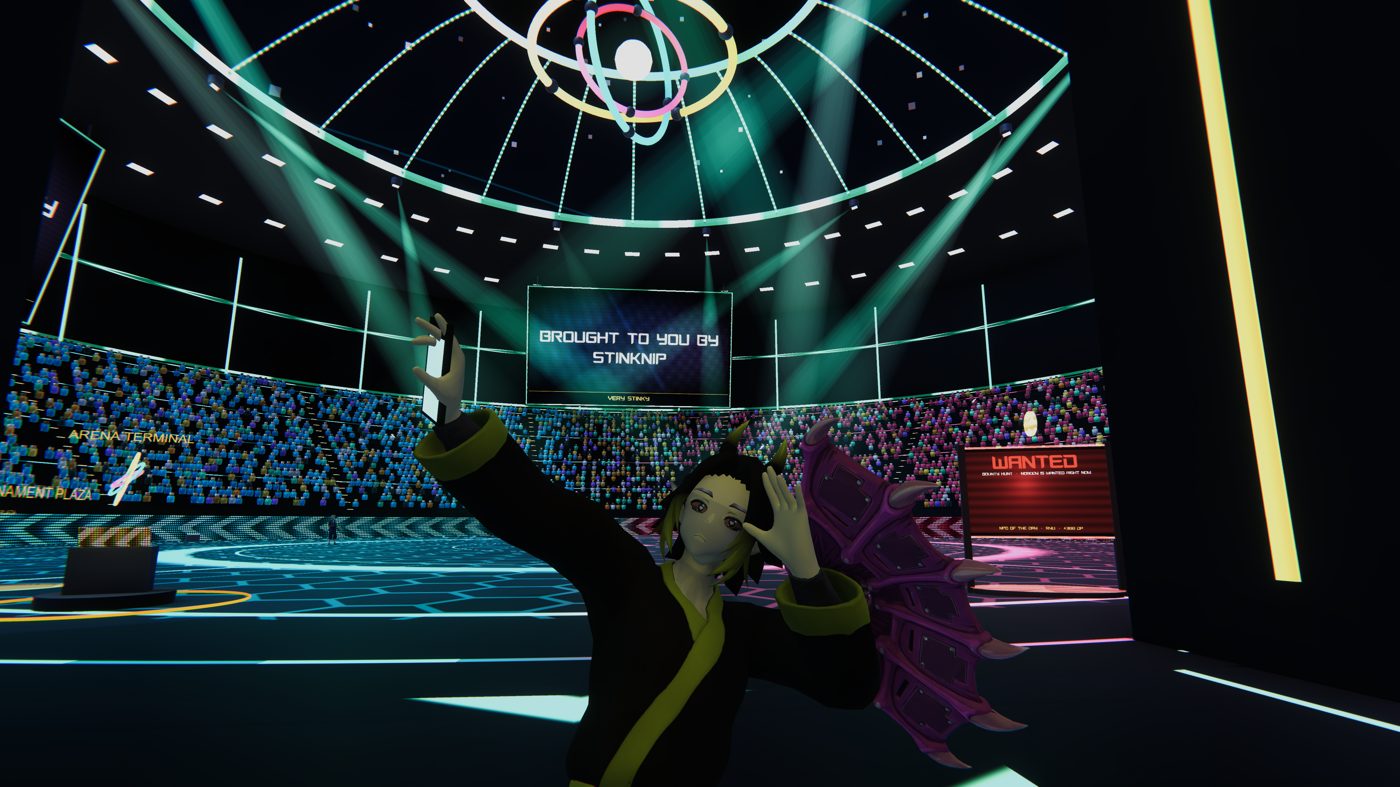
| POSE | Hands on Hips, Kneel, Selfie, Draw |
| MOOD | Frustrated, Sad |
Some emotes play once; poses and dances keep going until you move. For the Selfie, your duelist pulls out a phone. Online, everyone near you sees your emotes, and you see theirs.
Photo mode
Press F10 for PHOTO MODE: in the station, in your Team Base and in any duel, whenever no window is open. The HUD, the chat and every name tag disappear, yours too. Other duelists stay in the picture, without their names.
| Key | Action |
|---|---|
| W A S D | Fly the camera |
| Q / E | Down / up |
| Shift (hold) | Faster |
| Drag with the mouse | Look around |
| Mouse wheel | Zoom |
| H | Hide or show the panel |
| Enter or F9 | Save the photo |
| F10, Esc or right-click | Leave photo mode |
The camera stays within 15 m of your duelist and stops at walls. The panel on the right has four tabs:
- POSE: your duelist holds one of the 28 emotes; MOMENT picks the frame. Not during a duel.
- FACE: Neutral, Smile, Angry, Sad, Surprised, Devious, Happy or Evil.
- FILTER: Normal, Warm, Cold, Noir, Holo or Retro, plus depth of field. The focus follows the middle of the picture.
- TIME: FREEZE NPCS stops the people around you. Duels and other players keep going.
Photos are saved at twice your screen size into the game's Screenshots folder; OPEN FOLDER on the message takes you there. The HUD and the panel are never in the photo. In a duel against an NPC the duel waits while you take photos; an online duel keeps going and photo mode closes when it is your turn to act. Astra Rares show their full look in photos too, in a duel and in the Emporium's vitrines.
In a duel
Your duelist reacts to how the duel goes:
- Drawing a card plays the card-draw motion.
- Taking a big hit of 1,000 damage or more makes your duelist flinch.
- Losing at 0 LP knocks your duelist to the floor; any other loss ends in frustration or sadness.
- Winning plays your victory pose, picked in your profile. When a rival beats you, they cheer.
Duel disks
Every duelist owns the Astra Disk. It hangs in your items (I) under Equipment: press Equip to wear it on your left arm, in the city and in duels, and Unequip to take it off. Other duelists online wear the disk their own character carries, the rivals and most NPC duelists around the station the Astra Disk.
Earlier saves held eight more disks (Monster, Battle City, Chain, Gun, Supreme, Supreme II, Kaiba and Vampire). They were taken back once; if you wore one, you wear the Astra Disk again. Disks are purely cosmetic. To recolor yours, pick a disk tint in your duel look, or paint it in the workshop below.
Paint and decals
The Duel Disk workshop is open to admins only for now. The server can open it to every signed-in duelist later.
Pick a disk in your items (I) under Equipment and press PAINT & DECALS. The workshop shows your disk on its own, your other disks on the left and the tools on the right.
- Paint: every disk has four colour channels, PRIMARY, SECONDARY, LIGHT TRIM and DARK FRAME. Give each one any colour with the R, G and B sliders, a hex code or one of the quick colours. The disk keeps its shading. DISK'S OWN COLOURS puts the original back. A painted disk ignores the disk tint of your duel look.
- Finish: each channel can also get a finish. NORMAL is for everyone; the others come with a Patreon tier (see Patreon finishes and motifs).
- Decals: up to six per disk. EMBLEM opens the team emblem editor (every emblem, solid, linear or radial colours), ASTRA and WORDMARK are the Astra logos, PICTURE uses one of your own pictures, PATRON a Patreon motif.
- With the mouse: click a decal on the disk to pick it and drag it anywhere; it follows the disk's curves and edges. The mouse wheel makes it bigger or smaller, Shift + wheel turns it, Delete removes it. Drag next to the decals to turn the disk, use the wheel there to zoom. MIRROR, TURN and COLOURS are buttons too.
- Your own pictures: under MY PICTURES, UPLOAD... takes a PNG or JPG. It is made small (256 × 256 pixels) and waits for an admin: until it is approved, only you see it. Once approved, everyone sees it on your gear; if it is not approved, it is removed and you get a message. You can keep up to 12 pictures.
Each disk keeps its own look, saved with your progress. Online, other duelists see your disk and its look when you play a character you built in the creator; on a preset character they see the Astra Disk. The same decals and mouse controls work in the D-Wheel garage (G while riding).
Patreon finishes and motifs
| Tier | Finishes | PATRON motifs |
|---|---|---|
| Signal Supporter | METALLIC (brushed metal) | PATRON CREST |
| Duelist Insider | + PEARL (the colour tips as you turn it) | + DUELIST INSIDER |
| Astral Vanguard | + HOLO FOIL (a rainbow sheen), GALAXY (stars drifting in the colour) | + ASTRAL VANGUARD, the signs of SLIFER, OBELISK and RA |
| Founder's Circle | + PATRON STUDIO (three colours of your own as a moving gradient, tempo 1 to 5) | + FOUNDER'S CIRCLE |
Each tier keeps what the tiers below give. Founder's Circle pictures are approved at once. If a tier ends, your saved disk keeps its finishes and motifs, but you and everyone else see the disk without them until the tier is back.
Companion monsters
A monster can follow you through Astra Station. Open your items (I) and pick the COMPANION tab: eight monsters come along in 3D, Mokey Mokey, Penguin Soldier, Zombie Tiger, D.D. Assailant, Obnoxious Celtic Guard, Spell Canceller, Jinzo and Dark Necrofear.
- UNLOCK a companion once with DP (click again to confirm). You don't need its card. Prices go from 1,500 DP (Mokey Mokey) to 5,000 DP (Dark Necrofear).
- SUMMON brings an unlocked companion, DISMISS or NONE sends it home. Switching is free; one walks with you at a time.
- Your companion hovers at your right shoulder (your duel disk is on your left arm). It bobs gently, leans into where it goes and into curves, and looks at you when you stand still. Run too far ahead or teleport and it flickers back to your side. It follows you into your Team Base and shrinks there along with you.
- Every companion is about as big as Mokey Mokey, which is 0.7 m tall: slim monsters grow and broad ones shrink, and none is taller than 1 m, so none rises over your head. Mokey Mokey, Spell Canceller and Dark Necrofear fly on their own; the others ride a small glowing hover disc.
- Cheer with an emote from the CHEER ring and your companion cheers along.
- During a duel it steps away and comes back when the duel is over.
- Online, everyone near you sees your companion, and you see theirs. OTHERS' COMPANIONS at the bottom of the tab switches the other duelists' companions off on your PC.
Companions are purely cosmetic.
Patreon companion skins
Patrons can put a skin over their companion: a glowing layer over the monster with a few sparks, named like the name styles of the tier, so your name, duel disk and companion can match. Click SKIN in the COMPANION tab on any unlocked companion. One skin is worn by whichever companion walks with you.
| Tier | Skins |
|---|---|
| Signal Supporter | ASTRAL (a blue hologram shimmer, small twinkling stars) |
| Duelist Insider | + INFERNO (an orange-red glow with flames running up, rising sparks) |
| Astral Vanguard | + SLIFER RED, OBELISK BLUE, RA GOLD (the god's colour with a light aura) |
| Founder's Circle | + PATRON STUDIO (three colours of your own running up the monster, tempo 1 to 5) |
Each tier keeps what the tiers below give. Everyone near you sees your skin. If a tier ends, your companion walks in its own colours again; your pick comes back with the tier.
Character creator
Hair, face, body, eyes and make-up are free for every duelist, along with a starter outfit. All other clothing is sold in Violet's Boutique. Once you own a piece, it appears in the character creator; pieces you don't own yet stay hidden.
EDIT CHARACTER, in the boutique and on your profile, opens the character creator at any time, and WEAR NOW puts on a piece right after you buy it. Online, the duelists around you see your new look as soon as you save it.
Your look in a duel (card backs, sleeves, LP styles and more) is set in your profile and comes from Jaune's shop, from playing or from the Astra Capsules.